If you use AWS CLI v2, you might already know that it comes with several improvements, including better command completion. However, if you’re using the fish shell, you might have noticed that AWS CLI does not natively provide completion support for it. Luckily, fish is incredibly powerful when it comes to handling completions, and enabling AWS CLI autocompletion requires just a single line in your configuration file. Once set up, it works seamlessly, making AWS command-line operations much more efficient.
Step 1: Install AWS CLI v2 Using Homebrew
brew install awscliverify that it’s working:
aws --versionStep 2: Enable AWS CLI Command Completion for Fish Shell
AWS CLI v2 doesn’t natively provide command completion for fish. to fix it:
- Open your fish shell configuration file:
vim ~/.config/fish/config.fish- Add the following line to the end of file to enable AWS CLI command completion. This line ensures that AWS CLI completions are loaded when you start a new fish session.
test -x (which aws_completer); and complete --command aws --no-files --arguments '(begin; set --local --export COMP_SHELL fish; set --local --export COMP_LINE (commandline); aws_completer | sed \'s/ $//\'; end)'Step 3: Source Your Fish Config
Once you’ve added the line to your config.fish file, reload your fish configuration to apply the changes.
source ~/.config/fish/config.fishStep 4: Test AWS CLI Command Completion
Now that the completion is enabled, test it by typing an AWS CLI command, such as:
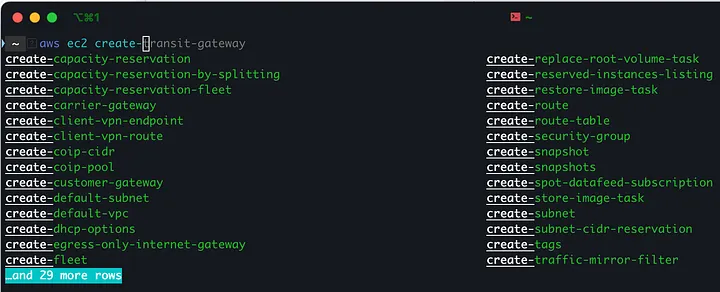
aws ec2 create-<Tab>After pressing Tab, you should see a list of available options like this:
If you’re an AWS user and fish shell enthusiast, this setup is a must-try!